Remote monitoring and management, sized for a small IT business.
Most RMM platforms are built for MSPs with a NOC and a dozen technicians. SilverTech Master System gives a small shop the parts it uses every day: a monitoring agent on every Windows PC and Mac, an Alert Center that sorts what needs you, scripts and updates on a schedule, and one-click remote access. One price covers your whole team.
What the RMM does
Monitoring agent
A light agent on each Windows PC and Mac reports Windows and macOS updates, antivirus, firewall, BitLocker or FileVault, disk and SSD health, battery wear, CPU and memory, ping and internet speed. More →
Alerts that sort themselves
Needs attention lists only what needs you: offline machines, low disk space, failing drives, failed backups, busy CPUs. A morning email sums it up. More →
Scripts & automation
Keep a PowerShell, Command Prompt and Mac script library. Run a script on one computer now, or schedule it for every computer a client has. More →
Windows & app updates
Install waiting Windows updates on your schedule, keep apps like Chrome and Zoom current with winget or Homebrew, and flag outdated versions. More →
Remote access
Click Connect on any computer and you're on its desktop. RustDesk is installed and kept working on every PC by the agent. More →
Client records & portal
Every computer belongs to a client, with their contacts, plan and billing beside it, and a portal where clients see their own PCs. More →
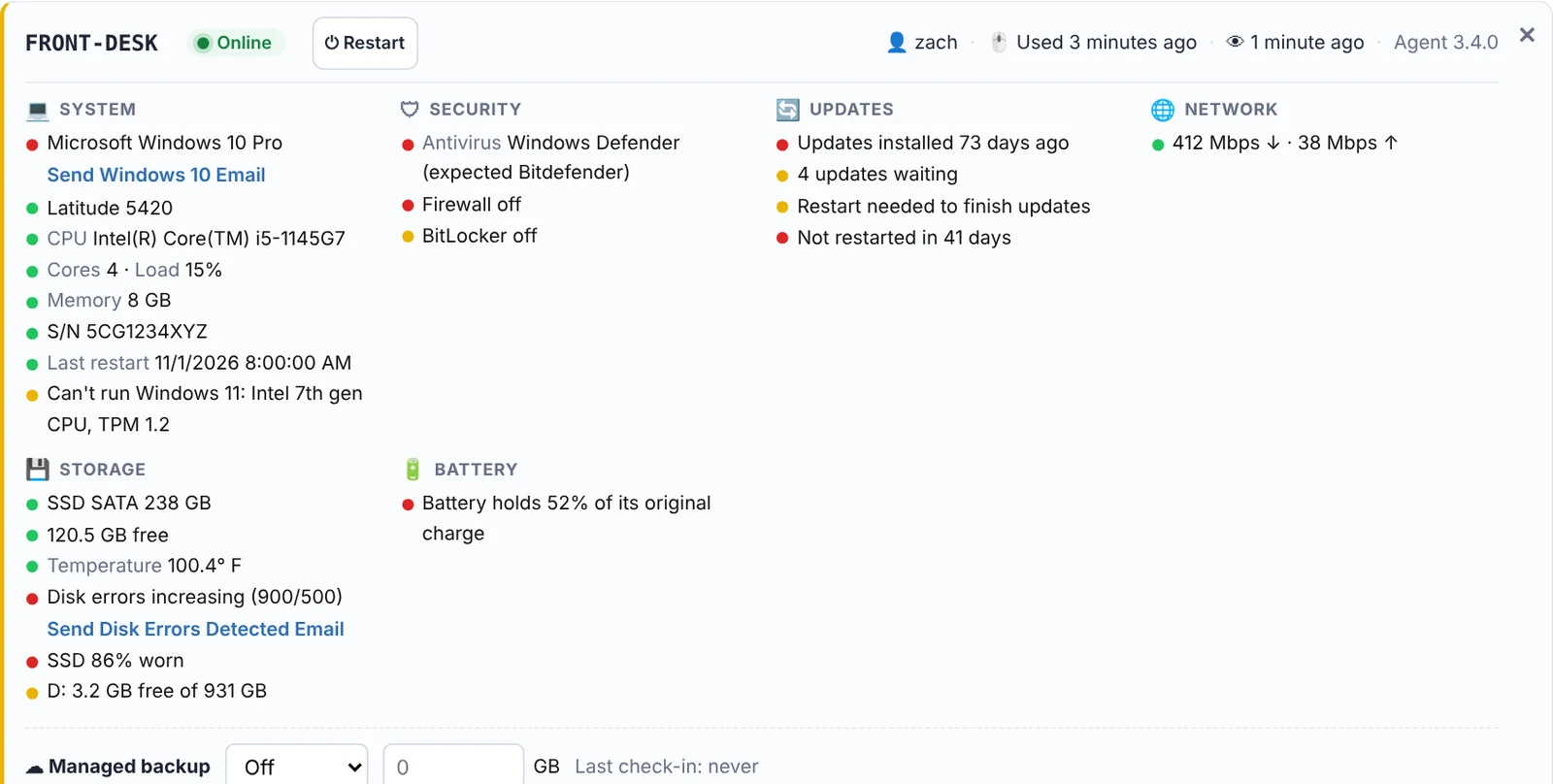
Every PC and Mac on one card, read in five seconds.
The agent runs as SYSTEM (or root on a Mac) in the background and checks in on the schedule you pick, plus after every restart. Each computer gets a card grouped into system, security, updates, storage, battery, backup and network, with a green, yellow or red dot on every line.
- Thresholds you choose for disk space, days offline, drive temperature, CPU and memory
- Offline alerts for servers within minutes, and another email when they're back
- CPU and memory charts for the last day, week or month
- Your logo in the client's taskbar, one click from calling you
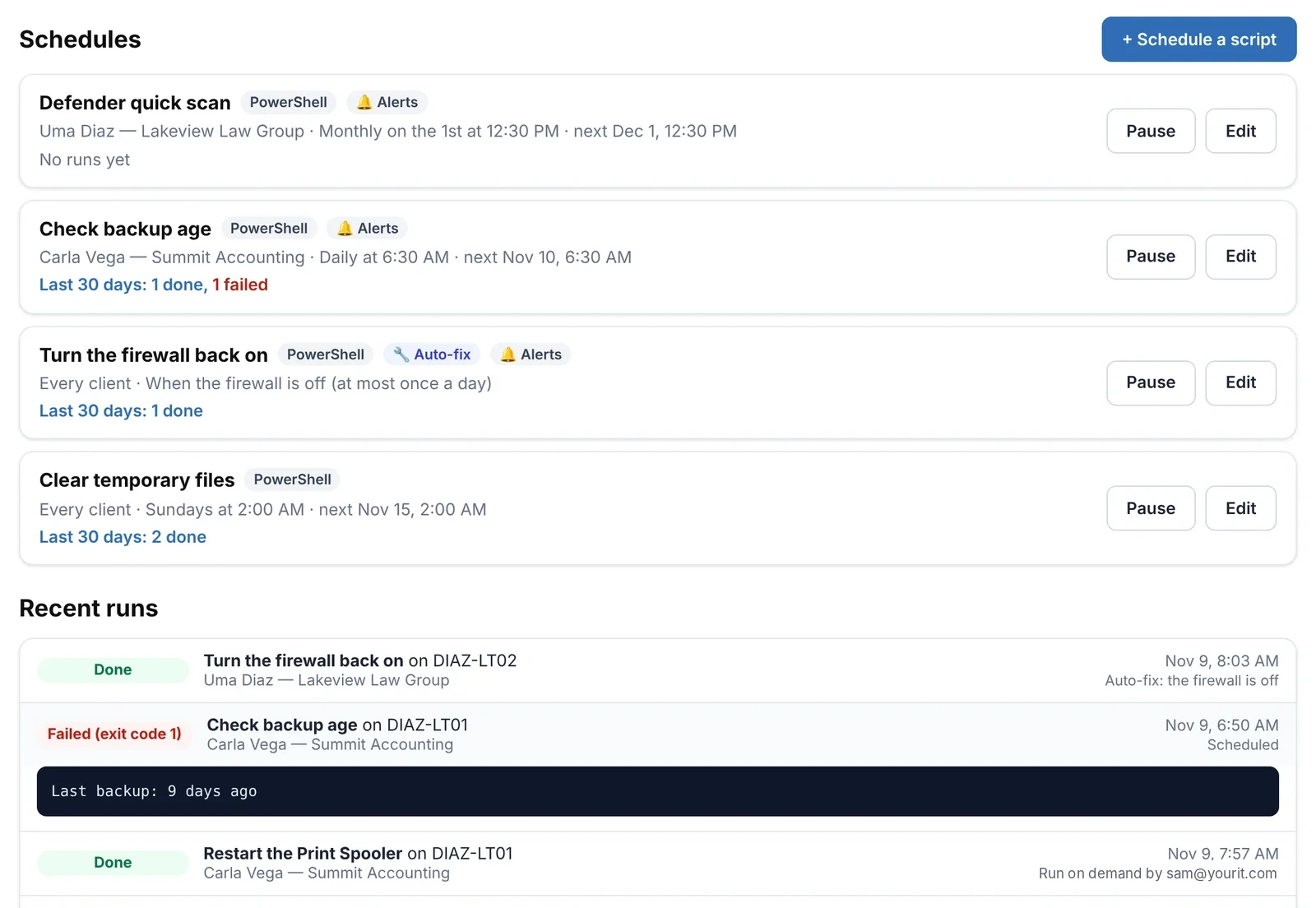
Fix it from your desk, or let it fix itself.
Schedule scripts for a client's computers, or attach one to an alert so it runs the moment a computer reports the problem, then checks again so the alert clears. Every run keeps its output and exit code.
- Built-in tasks: install and update apps, Windows updates, restart when needed, free up disk space
- Install your own .exe, .msi or Mac .pkg silently from a link
- Remote console and file browser without interrupting the user
- Restart or shut down with a message, and remove the agent when a computer leaves
Is a simple RMM enough for you?
A large RMM suite fits better if you need
- Ticketing, time tracking and invoicing in the same tool (a full PSA)
- Linux servers and network devices monitored by an agent
- Patch approval rings and compliance reports for hundreds of endpoints per technician
SilverTech Master System fits if you want
- Windows PCs and Macs monitored with alerts that make sense
- Scripts, updates and remote access without a training course
- Your whole team on one price, plus client websites and billing in the same place
Install the agent on a few PCs next to the RMM you use today.
Free for 14 days. No credit card needed to start.
Questions
What does RMM stand for?
Remote monitoring and management: software that watches your clients' computers for problems (monitoring) and lets you fix them without visiting (management), usually with an agent on each computer, scripting, patching and remote access.
Which computers does the agent support?
Windows PCs and servers, and Macs on macOS 12 or later (Apple silicon and Intel). There's no Linux agent.
How is it priced?
Per workspace, with unlimited technicians. Remote access is an add-on priced by the number of PCs. See the FAQ for current prices, or how that compares with per-technician RMMs.
Can I try it alongside my current RMM?
Yes. Install the agent on a few computers (or push it from your current RMM as a script). Both run side by side, and new computers show up in your workspace with a suggested client.
Does it include ticketing?
No. There's no ticketing or PSA. Most small shops pair it with their email or a help desk they already use.
An RMM your whole team can learn in an afternoon.
Free for 14 days. No credit card needed to start.