The tools a small IT business actually uses, in one place.
Most shops looking after 20 to 1,000 PCs pay for an RMM per technician, a remote tool on top, a website builder per site, and keep client details in a spreadsheet. SilverTech Master System puts the client, their computers, their alerts and their website on one card, priced per workspace.
PC monitoring
A light agent on each Windows PC reports Windows Update, antivirus, BitLocker, disk and SSD health, battery wear and Windows 11 readiness. More →
Alert Center & email
Every PC that needs you, in one list, with a morning summary email. Machines that go offline, run out of space or stop updating stand out. More →
Remote access
One click from the alert to their desktop, from your computer or your phone. RustDesk is installed and managed for you. More →
Backup tracking
Name the backup levels you sell, see which machines have them, and get told when one stops checking in. More →
Client records
Clients, contacts, plans and every computer they own, with emails you can send in a click when something needs doing. More →
Client websites
Build and host your clients' websites on their own domains, with SEO tools and visitor statistics built in. More →
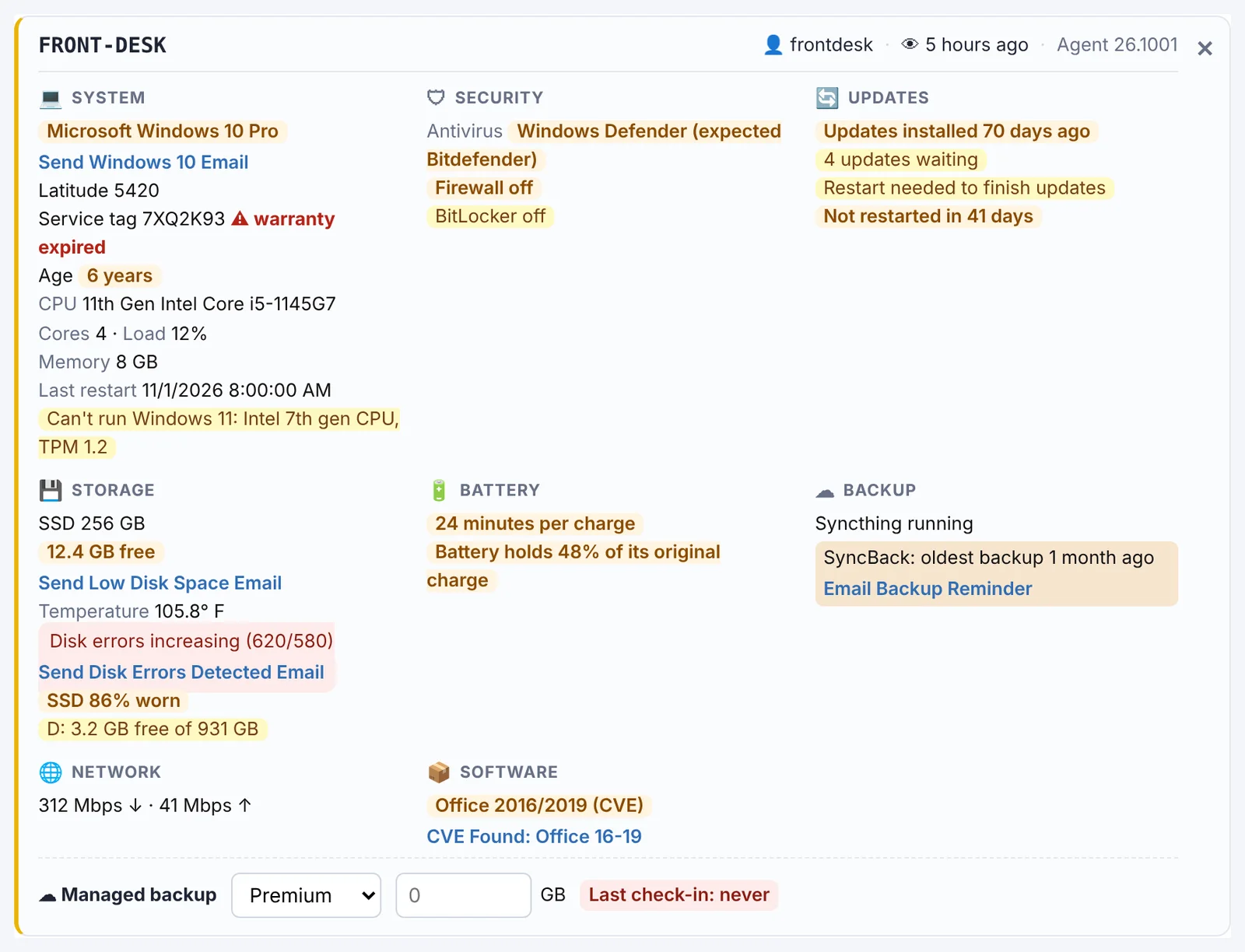
Every computer on one tidy card.
System, security, updates, storage, battery, backup and network, each in its own place, with problems highlighted and an email to the client one click away.
- New PCs sort themselves into the right client
- Your logo in their taskbar, so clients know who looks after them
- Works for one business or several brands from the same workspace
Priced for a small shop
One price per workspace covers your whole team. Add a technician and your bill doesn't change. How that compares with per-technician tools →
Try it on a few PCs this week.
Free for 14 days. No credit card needed to start.
Questions
Who is it for?
IT service businesses and small MSPs looking after roughly 20 to 1,000 Windows PCs for their clients, from a one-person shop to a team of technicians. It suits shops that also build websites for their clients especially well, because the websites live in the same workspace.
Is it an RMM?
It covers what most small shops use an RMM for: a monitoring agent on every Windows PC, an Alert Center for problems, email alerts, remote access and backup tracking. It doesn't run scripts or push patches for you, and there's no ticketing system. Many shops find that the simpler set is all they actually use.
How is it priced?
Per workspace, not per technician. A workspace is $99/month and includes your whole team. Remote access is an add-on priced by the number of PCs. See the FAQ for current prices.
Do I have to move everything at once?
No. Install the agent on a few PCs alongside the tools you use today. Computers show up in your workspace on their own, ready to assign to clients, and you can switch over when you're happy.
Built by an IT business, for IT businesses.
Free for 14 days. No credit card needed to start.