Recurring payments for your support plans, without a volume-based fee.
MoonClerk puts recurring payment forms on top of your Stripe account and charges a monthly fee that goes up with how much you take in. SilverTech Master System does the same job for IT businesses as part of your workspace: sign-up forms, subscriptions and pay-any-amount pages in your own Stripe account, right next to each client's computers and support plan.
What moves over
Sign-up forms
A form for each plan you sell: one or more prices, weekly to yearly or every few months, with your own questions. Link to it or embed it with one line of code.
Setup fees, trials & coupons
Optional setup fee and free trial, plus coupons for percent or dollars off, once, for a few months or for good.
Pay-any-amount pages
Like MoonClerk's register: clients type what they owe, or your link fills the amount in.
One-time charges
Charge a client's card now or add a charge to their next bill, with your description on the receipt.
Card updates & receipts
Email a card update link in one click. Clients can update their card and see receipts.
Failed payments
Payments that fail show in your Alert Center with Stripe's next retry, so nothing slips.
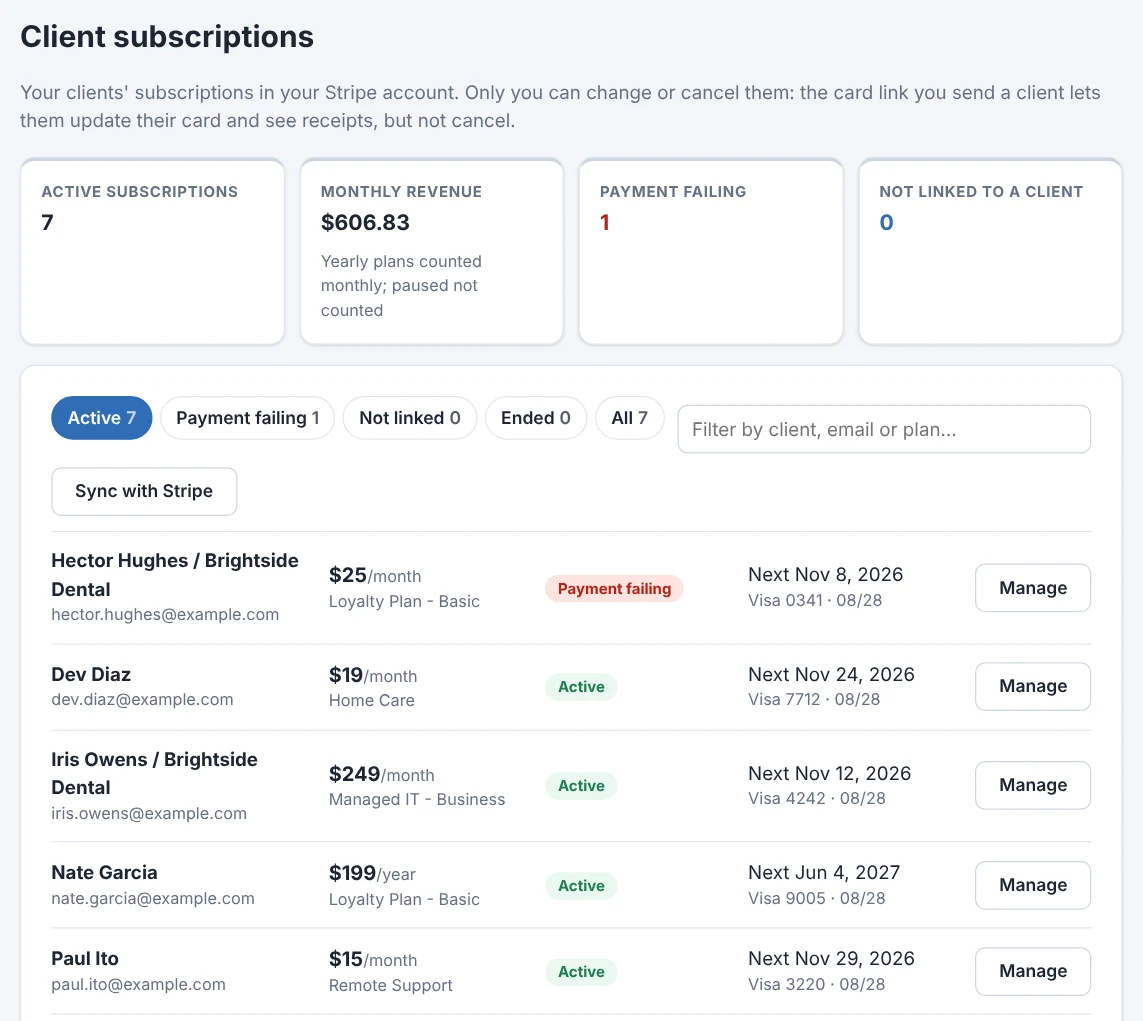
Every subscription beside the client it belongs to.
Connect your Stripe account and every subscription in it shows up, matched to the right client by email or linked by hand. Change the amount, pause, resume or cancel from the next charge on, and see what the next bill comes to.
- Your existing Stripe subscriptions show up as they are: nothing to recreate
- Monthly revenue at a glance
- The money goes straight to your Stripe account, with no fee on top of Stripe's
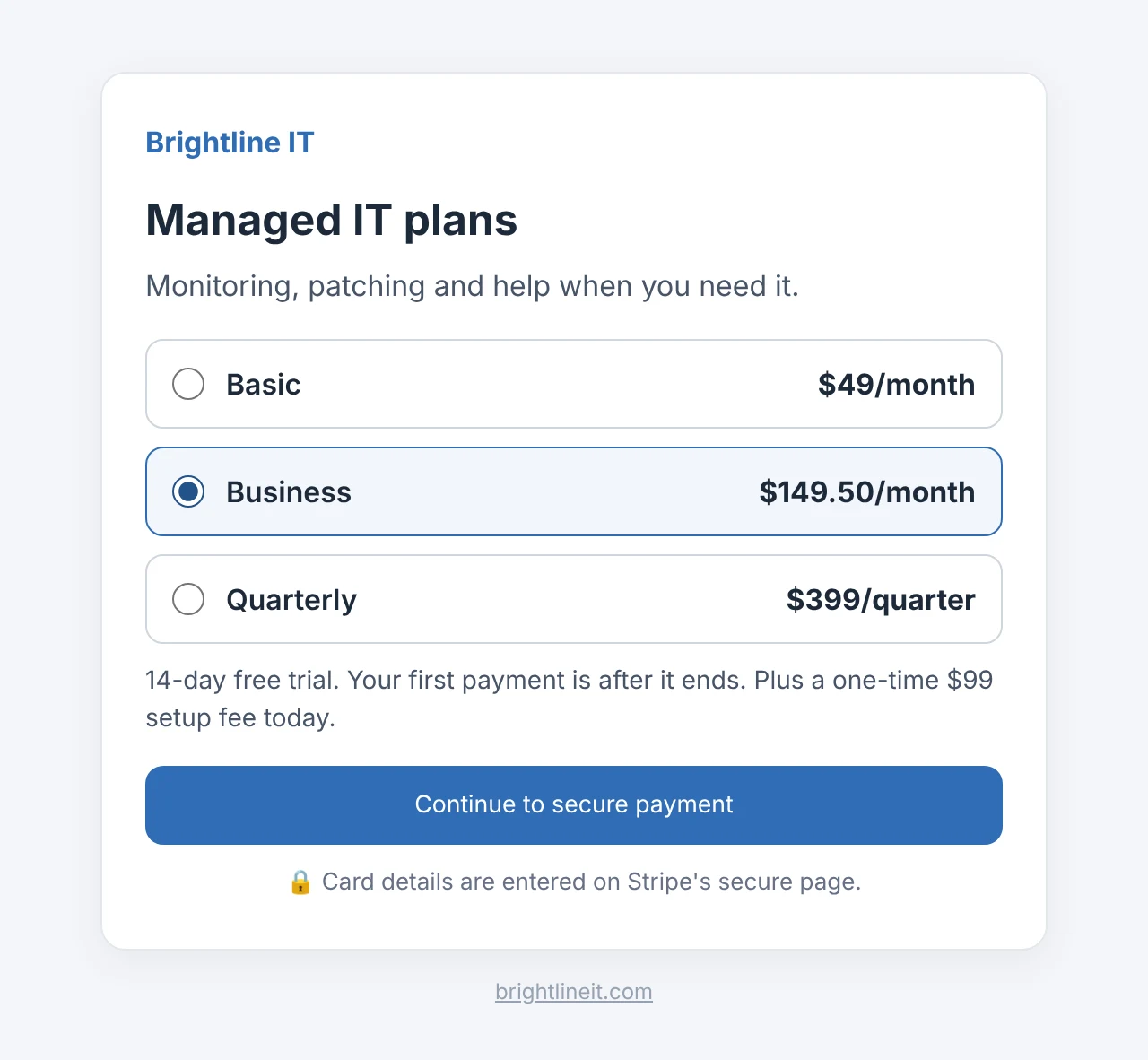
Forms that look like your business.
Each form carries your brand's name, logo and color, and ends with a thank-you message or your own page. Payment happens on Stripe's secure page, and the new subscription lands in your list.
- Run more than one brand? Copy a form and pick the other brand in one step
- Pause a form any time
- Coupons by promo code or applied from a link
MoonClerk and SilverTech Master System side by side
MoonClerk is a payment form tool for any kind of business. SilverTech Master System is an IT business platform with recurring billing built in.
| MoonClerk | SilverTech Master System | |
|---|---|---|
| How it's priced | Monthly fee by payment volume | Included in your workspace |
| Payments | Your Stripe account | Your Stripe account |
| Recurring sign-up forms | Yes | Yes |
| Pay-any-amount pages | Yes | Yes |
| Next to the client's computers & plan | No | Yes, on the same page |
| Failed payments in your alerts | Its own dashboard | In the Alert Center with everything else |
MoonClerk details from MoonClerk's pricing page. Check MoonClerk's site for its current plans and features.
Which one is right for you?
MoonClerk fits better if
- You're not an IT business and only need payment forms
- You need its specific integrations
SilverTech Master System fits better if
- You sell IT support plans and want billing next to each client
- Your payment volume is growing and you'd rather not pay more for it
- You also monitor your clients' computers or build their websites
Connect Stripe and see your subscriptions matched to clients in minutes.
Free for 14 days. No credit card needed to start.
Questions
Do I have to move my subscriptions out of Stripe?
No. MoonClerk and SilverTech Master System both work on top of your Stripe account. Connect it, and the subscriptions already there show up in SilverTech Master System, matched to clients.
Can I keep my MoonClerk forms running while I switch?
Yes. Your MoonClerk forms keep working until you turn them off. Make SilverTech Master System forms for new sign-ups, then retire the old ones when you're ready.
Is there a fee per payment?
No. You pay Stripe's usual fees, and recurring billing is part of your SilverTech Master System workspace.
Can clients cancel themselves?
No, on purpose: only you cancel or change a subscription, so a support plan doesn't end without a conversation. Clients can update their card and see receipts.
What about donations or PayPal?
Forms on websites you build for clients can take payments or donations through your client's own PayPal account. Subscriptions run through Stripe.
Grow your payments, not your payment fees.
Free for 14 days. No credit card needed to start.